Transformation of UML descriptors and tags
In this section are specified transformation rules for UML descriptive elements. Table 1 provides an overview of the section coverage.
| UML element | Rules in core ontology layer | Rules in data shape layer | Rules in reasoning layer |
|---|---|---|---|
Name |
|||
Note |
|||
Comment |
|||
Tag |
|||
Source |
Name
Most of the UML elements are named. The UML conventions dedicate an extensive section to the naming conventions and how to deterministically generate a URI and a label from the UML element name. By default, we recommend the use of the SKOS lexicalization (skos:prefLabel) in the core ontology layer. In the future, this could be controlled by a flag in the configuration of the transformation tool. With such a flag one could enable RDFS lexicalization (rdfs:label) instead of, or in addition to, the SKOS lexicalization.
Specify a label for the OWL entity based on the name of the UML element.
Listing 1. Labels in Turtle syntax
|
Listing 2. Labels in RDF/XML syntax
|
Specify a label for the SHACL shape, based on the name of the UML element.
Listing 3. Label declaration for NodeShape in Turtle syntax
|
Listing 4. Label declaration for NodeShape in RDF/XML syntax
|
Listing 5. Label declaration for PropertyShape in Turtle syntax
|
Listing 6. Label declaration for PropertyShape in RDF/XML syntax
|
Note
Most of the UML element foresee provisions of descriptions and notes. They should be transformed into rdfs:comment and skos:definition.
By default, we recommend the use of the SKOS lexicalization (skos:definition) in the core ontology layer. In the future this could be controlled by a flag in the configuration of the transformation tool. With such a flag one could enable RDFS lexicalization (rdfs:comment) instead of, or in addition to, the SKOS lexicalization.
Specify a description for the OWL entity based on the note on the UML element.
Listing 7. Description in Turtle syntax
|
Listing 8. Description in RDF/XML syntax
|
Specify an annotation (comment or description) for the SHACL shape based on the note on the UML element.
Listing 9. Note declaration for NodeShape in Turtle syntax
|
Listing 10. Note declaration for NodeShape in RDF/XML syntax
|
Listing 11. Note declaration for PropertyShape in Turtle syntax
|
Listing 12. Note declaration for PropertyShape in RDF/XML syntax
|
Comment
In accordance with [uml2.5], every kind of UML Element may own Comments (see Figure 1). They add no semantics but may represent information useful to the reader. In OWL it is possible to define the annotation axiom for OWL Class, Datatype, ObjectProperty, DataProperty, AnnotationProperty and NamedIndividual. The textual explanation added to UML Class is identified as useful for conceptual modelling , therefore the Comments that are connected to UML Classes are taken into consideration in the transformation.
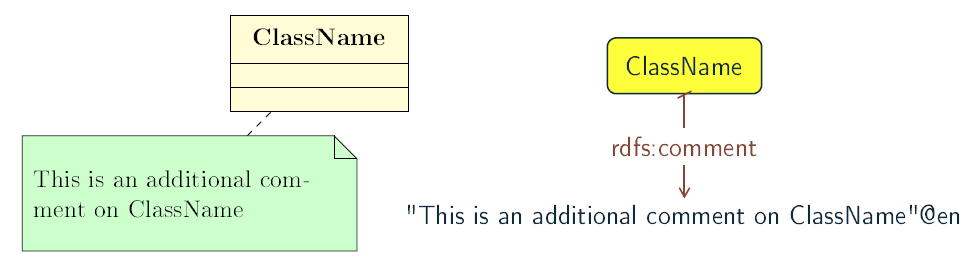
As UML Comments add no semantics, they are not used in any method of semantic validation. In OWL the AnnotationAssertion axiom [owl2] does not add any semantics either, and it only improves readability.
Note: In practice, comments on UML attributes and generalizations are unsupported, as explained in the rule:comments-uml-elems UML convention.
Specify an annotation axiom (comment or editorial note) on the OWL entity for the UML Comment associated to a UML element.
Listing 13. Comment in Turtle syntax
|
Listing 14. Comment in RDF/XML syntax
|
Specify an annotation axiom (comment or description) on the SHACL shape for the UML Comment associated to a UML element.
Listing 15. Note declaration for NodeShape in Turtle syntax
|
Listing 16. Note declaration for NodeShape in RDF/XML syntax
|
Listing 17. Note declaration for PropertyShape in Turtle syntax
|
Listing 18. Note declaration for PropertyShape in RDF/XML syntax
|
Tags
Any UML element can have additional information provided by means of tags, represented by UML Tag elements. Tags serve two purposes (as described in rule:tags-use-cases): to either provide additional description of an element or control the transformation process. Every descriptive tag should be transformed into annotation on the RDF resource representing the UML element (e.g. Class, Attribute, Connector).
For example, the language tags that are provided on the tag, can be used to generate multilingual ontologies/specifications. The elements highlighted in Figure 2 below would be transformed in the following Turtle statement epo:Procedure skos:definition "this is the definition in French"@fr .
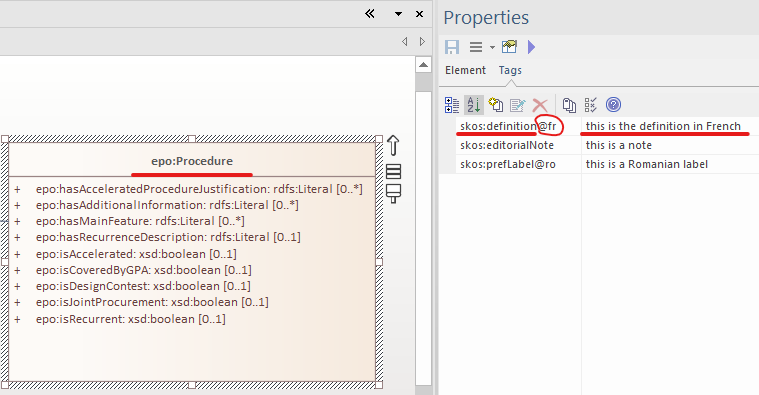
| The generation of annotations from tags could be controlled by a flag in the configuration of the transformation tool. |
Specify an annotation axiom on the OWL entity for a UML Tag associated to a UML element. Apply this transformation rule only for descriptive tags (as defined in as defined in rule:descriptive-tags). Detect the kind of tag by analyzing its key, and generate the proper RDF representation of the tag value as specified in rule:gen-tags.
The below snippets present generated RDF statements for the four supported forms of tags and their values: a plain literal, a literal with a language tag, a typed value and an URI. The snippets use suitable examples to demonstrate the idea.
The tagProperty indicates a part of a tag name with a compact URI (for example skos:related for a tag with the skos:related<> key).
Listing 19. Tag for a plain literal in RDF/XML syntax
|
Listing 20. Tag for a plain literal in RDF/XML syntax
|
Listing 21. Tag for a literal with a language tag in RDF/XML syntax
|
Listing 22. Tag for a literal with a language tag in RDF/XML syntax
|
Listing 23. Tag for a typed value in RDF/XML syntax
|
Listing 24. Tag for a typed value in RDF/XML syntax
|
Listing 25. Tag for a URI value in RDF/XML syntax
|
Listing 26. Tag for a URI value in RDF/XML syntax
|
Source
It is a good practice to annotate all concepts in an ontology with the IRI of the ontology where these concepts are defined. RDFS provides a dedicated property for purpose, called rdfs:isDefinedBy, which we will use.
Annotate all locally defined OWL concepts with the name of the (core) ontology that defines them.
Listing 27. Source in Turtle syntax
|
Listing 28. Source in RDF/XML syntax
|
For all SHACL shapes specify the source ontology defining the shape.
Listing 29. Source declaration for NodeShape in Turtle syntax
|
Listing 30. Source declaration for NodeShape in RDF/XML syntax
|
Listing 31. Source declaration for PropertyShape in Turtle syntax
|
Listing 32. Source declaration for PropertyShape in RDF/XML syntax
|